Basic plan
NT$3,500/month
- Competitor hotels
- 5 hotels
- Stay-date range
- Next 1 mo.
- Paid annually
- NT$35,000/year
A competitor price tool for hotels, business hotels and B&Bs in Taiwan
RoomPrice Monitor checks the competitor hotels you choose on Booking twice a day and organizes prices, price changes and your market position into an Excel report. Once Email/Telegram is set up, the highlights come straight to you. You still set the prices; you just no longer have to check page after page.
Before you subscribe, get 2 free reports built on the competitor hotels you choose.
RoomPrice Monitor currently monitors room prices only for hotels in Taiwan on Booking, in New Taiwan dollars (NT$). Thailand, Vietnam and other markets are planned, with no launch date yet.
Market position calendar
曙光旅店 (fictional) · October 2026
10/1–10/5 not monitored; phones show 10/6–10/18 first. See the full month in the screen tour
Calendar labels on this page are translated into English for reference.
Your hotel, the competitor hotels you want to compare, and the stay-date range you want to see. We help you with installation and setup.
The program runs on your Windows computer and checks Booking's public prices at two fixed times. If it hits a CAPTCHA, it retries automatically; if that still fails, it skips that entry for now and moves on to the next one.
Each run that gets valid prices produces an Excel report. Set up Email or Telegram, and the highlights come straight to you.
Real program screens · synthetic demo data
Screenshots show the program's Traditional Chinese interface.
Each day's cell shows your price, the competitor median, the gap and your market position. Colors show below, near or above market; the valid competitor count and recorded time are in the same cell, so you can tell when the sample is too small.
View full screenshot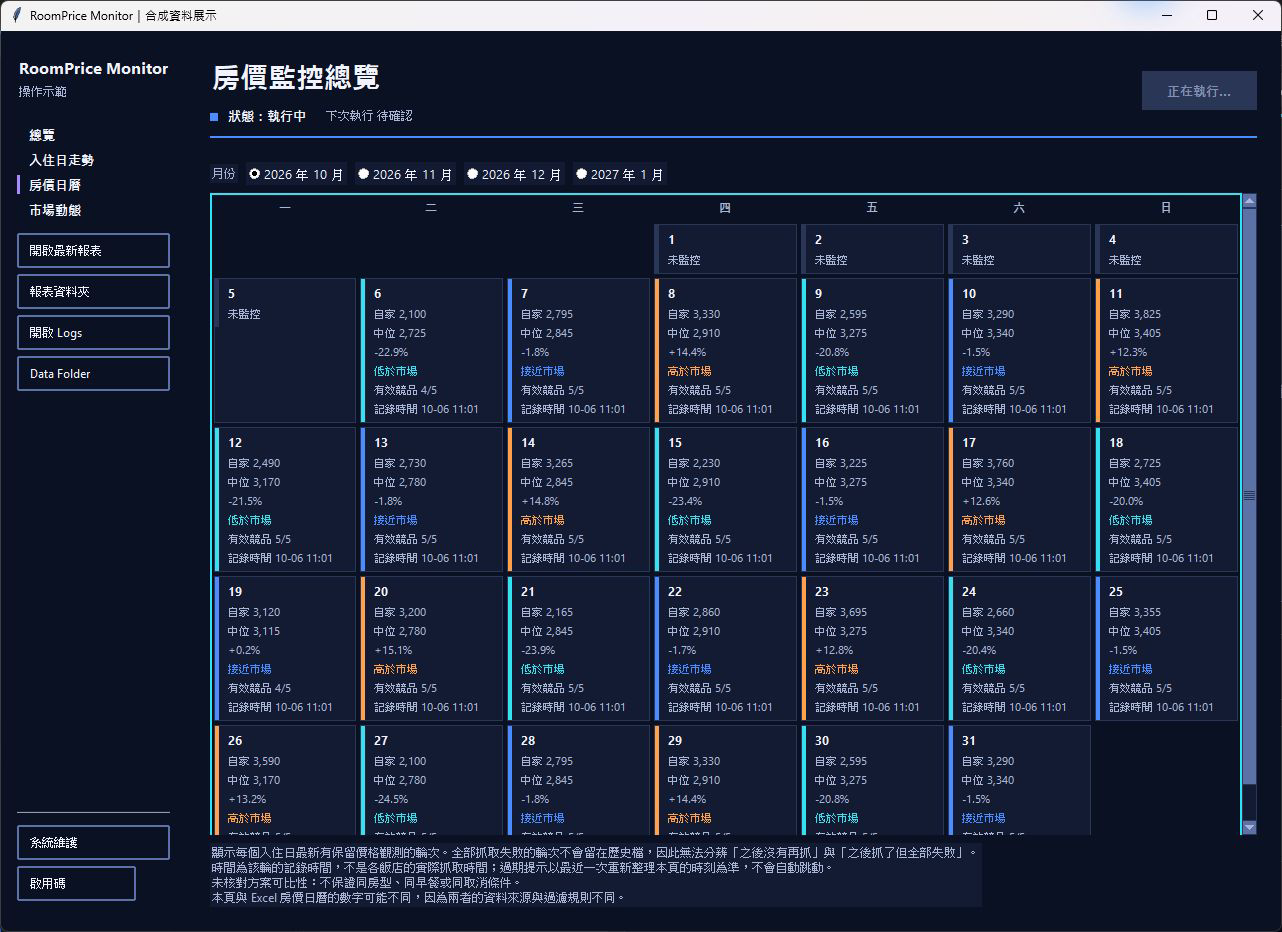 View full screenshot: Price calendar
Pick a stay date, then compare your price and the competitor median over 7, 30 or 90 days. In the price simulator, enter a hypothetical price to see how your rank and market position would change; it's only a calculation and doesn't change your actual data.
View full screenshot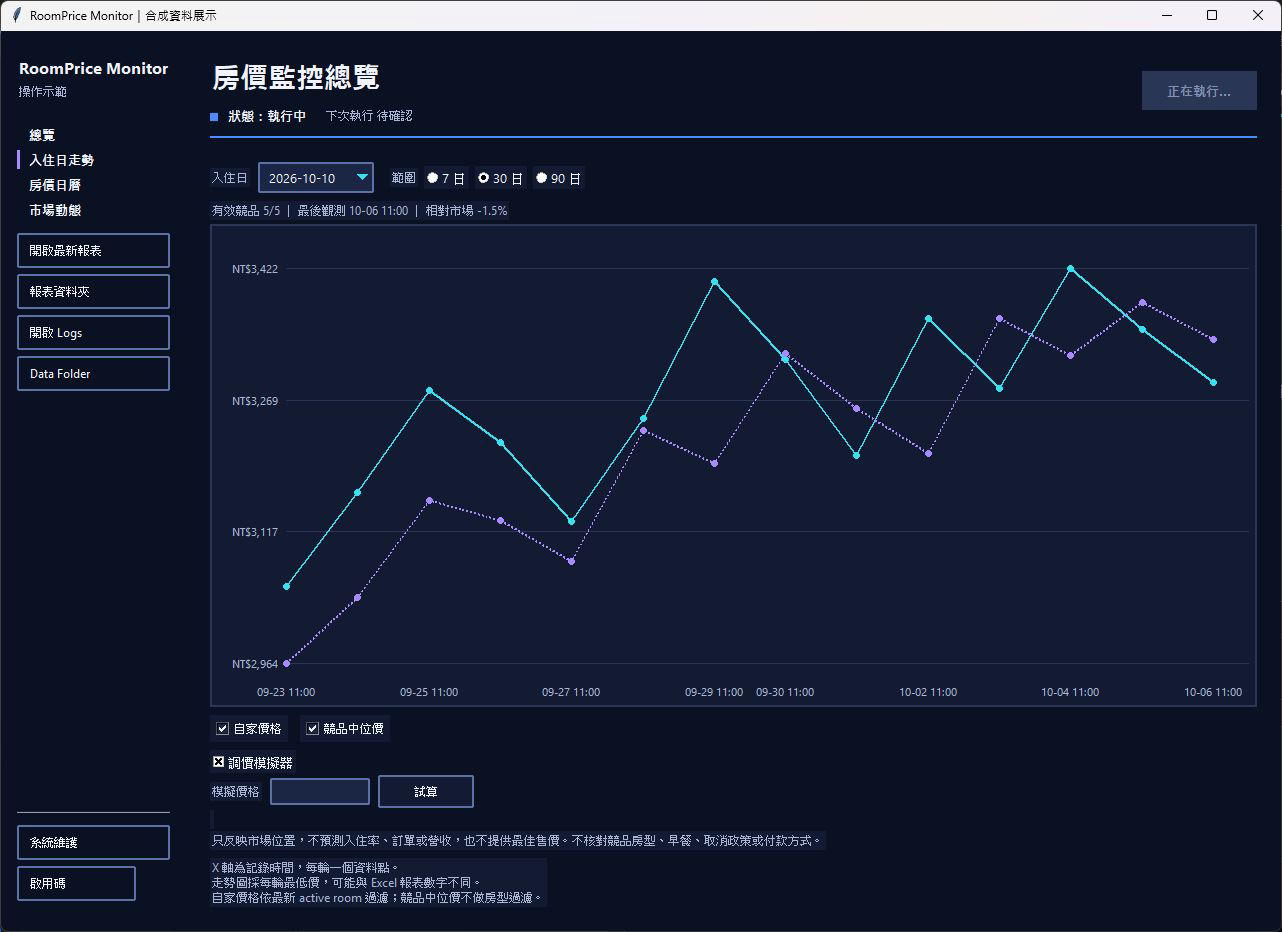 View full screenshot: Stay-date trend
Each stay date shows the market range and your position; the top of the screen first shows this run's capture rate, so read with care when data is incomplete.
View full screenshot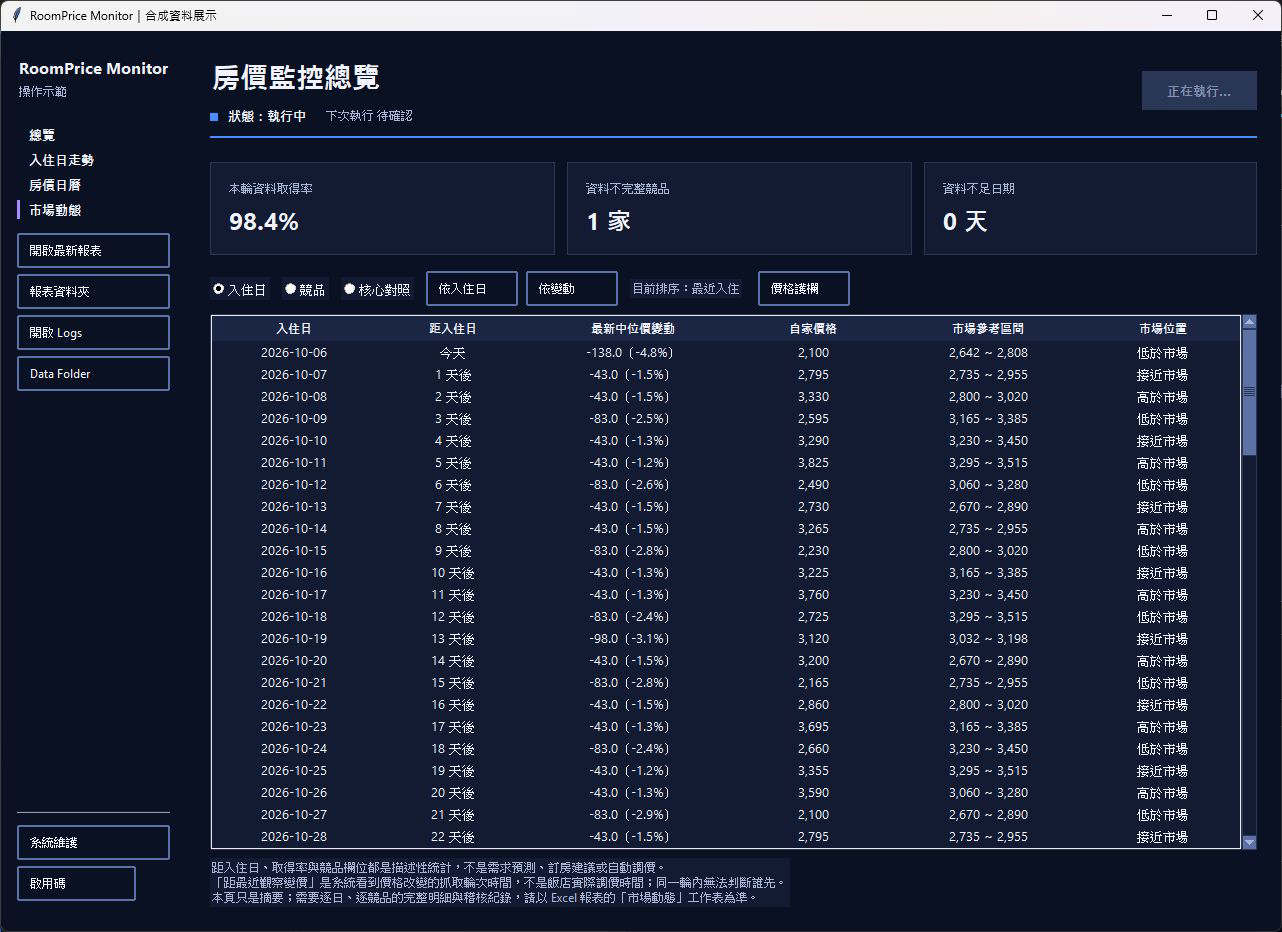 View full screenshot: Market dynamics
Pick your own core competitors and compare them side by side with all competitors; only prices from the same observed run and in the same currency are grouped together. With fewer than 3 valid competitors, no median is calculated, and old data is never used to fill in prices.
View full screenshot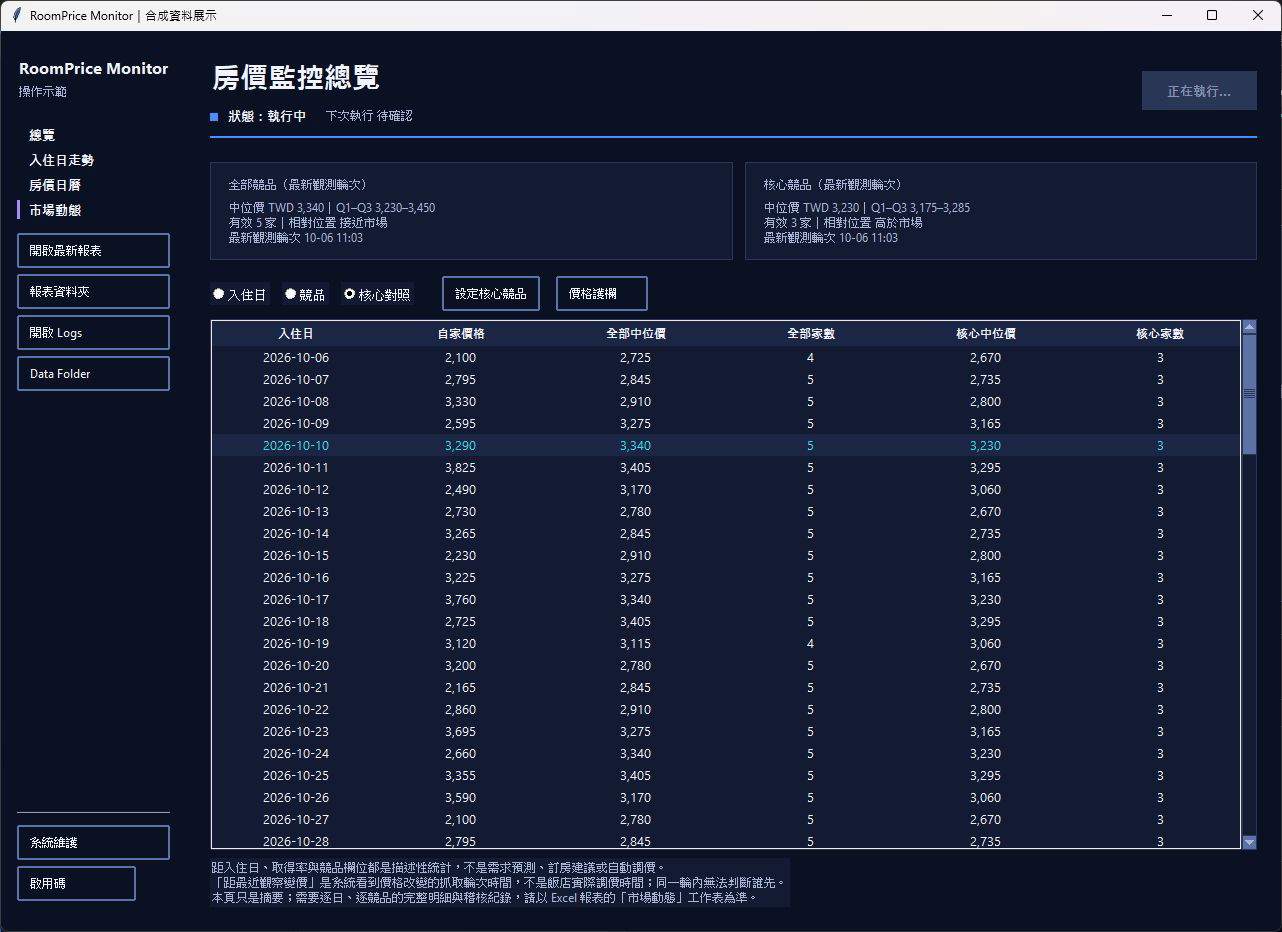 View full screenshot: Core comparison
Set price floors and ceilings and when they apply, such as a separate range for weekends; the program checks whether your current price is within range. This is a range check, not a recommended price, and it never changes prices automatically.
View full screenshot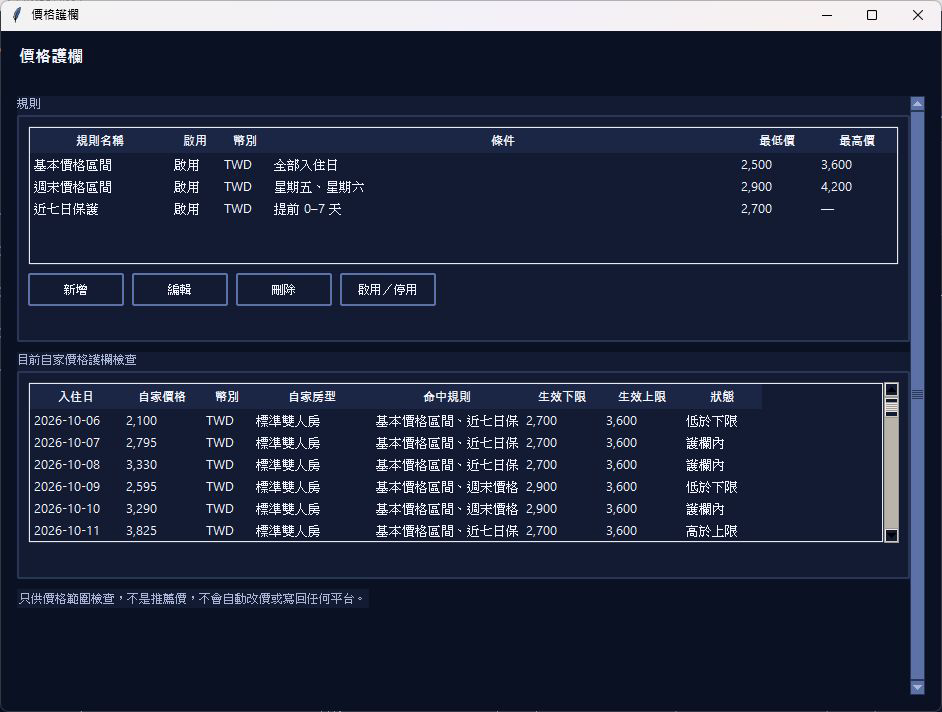 View full screenshot: Price guardrail
See the full tour of all six screens
Eight screens in 30 seconds: overview, trend, calendar, market dynamics, core comparison, price guardrail, Excel and Email. The video has no sound and shows on-screen captions in Chinese.Demo data | not real operating data
Each run that gets valid prices produces one Excel file. A full analysis that completes normally has 10 sheets; when data or an individual analysis is unavailable, some sheets are skipped or marked as having no data.
| Hotel name | 2026-10-06 | 2026-10-07 | 2026-10-08 | 2026-10-09 |
|---|---|---|---|---|
| 曙光旅店 | 2,100 | 2,795 | 3,330 | 2,595 |
| 河畔商旅 | 2,560 | 2,625 | 2,690 | 3,055 |
| 晴嶼旅宿 | 2,670 | 2,735 | 2,800 | 3,165 |
| 森光飯店 | 2,780 | 2,845 | 2,910 | 3,275 |
| 星灣旅館 | 2,890 | 2,955 | 3,020 | 3,385 |
| 雲岸旅店 | 3,065 | 3,130 | 3,495 |
Red = this hotel is more expensive than youBlue = this hotel is cheaper than youBlank = no usable price this timeShaded row = your hotel
Prices are each hotel's lowest visible price at the time; the same room type or rate is not guaranteed. Color rules match the Excel report.
Sheet names and column headings on this page are translated into English for reference; hotel names, room types and some rate terms are kept in Traditional Chinese, as Booking's Traditional Chinese pages show them; the data is a fictional demo.
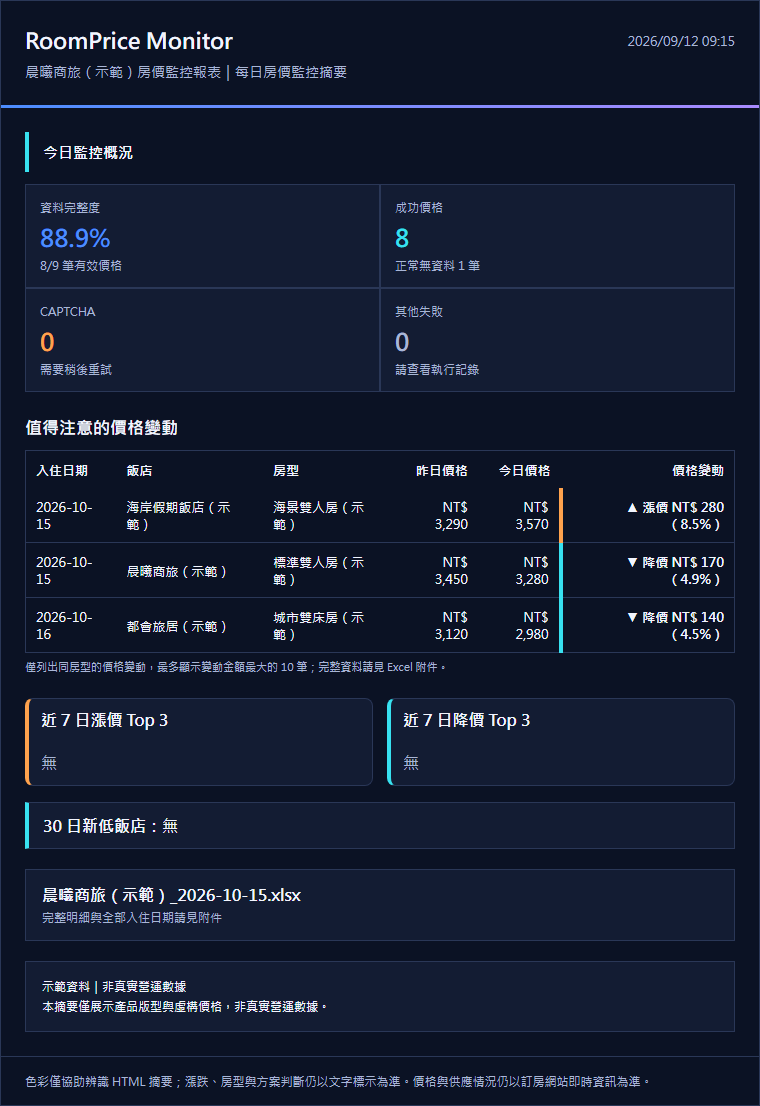
The Email summary covers data completeness, notable price changes, and rises and drops over the last 7 days. Only price changes for the same room type are listed; when the room type isn't shown, rises and drops need a manual check. Full details are in the attached Excel file. With Telegram set up, you can get price change alerts and the Excel report file on your phone.
The image is a sample of the Traditional Chinese Email layout and uses a different set of fictional data, so its numbers differ from the calendar above.
Price rises and drops are calculated only for the same room type. Market position compares each hotel's lowest visible price at the time, so the same room type or rate is not guaranteed, and important calls still need a manual check. When the room type isn't shown, rises and drops need a manual check.
The data consists of observations collected on a schedule, not live inventory. No data, a failed fetch or a currency mismatch can all leave a price blank; check the Booking page manually.
Every plan has the same features. All plans: 2 automatic runs a day; each run that gets valid prices produces an Excel report. All prices exclude tax, and the competitor hotel count does not include your own hotel.
NT$3,500/month
NT$6,500/month
NT$9,000/month
Monthly with no contract, cancel anytime. Annual billing: pay 10 months' fees at once for 12 months of use.
Add-ons (excl. tax): +NT$500/month for each additional competitor hotel; +NT$500/month for each extra month of stay-date range; +NT$1,200/month to extend it by 3 months at once. If the monthly fee with add-ons would be higher than the price of the next plan up that fully covers the same needs, you pay that plan's lower price instead. With annual billing, the plan and add-on monthly fees together are still charged for only 10 months, for 12 months of use.
We'll provide 2 free reports first so you can evaluate it on your own market, with no payment up front.
RoomPrice Monitor currently monitors room prices only for hotels in Taiwan on Booking, in New Taiwan dollars (NT$). Thailand, Vietnam and other markets are planned, with no launch date yet.
 Scan with your phone to add our official LINE account
@463spxng
Scan with your phone to add our official LINE account
@463spxng
Please confirm your plan and amount with us before paying. Don't pay until we've confirmed them.

Currently, only hotels in Taiwan on Booking, with prices in New Taiwan dollars (NT$). Thailand, Vietnam and other markets are planned, with no launch date yet.
An internet-connected Windows computer, desktop or laptop; only Windows is supported for now. The program runs on your computer on a schedule, so at the scheduled times the computer must be on and not asleep, and the program must stay running.
No. The program checks the prices Booking shows publicly and does not sign in to any account.
Reports and price history are stored on your own computer, and the program shows where the data is. Notifications go to the Email address or Telegram chat you specify.
No. The program organizes market information, marks dates worth reviewing, and gives “consider raising/lowering” signals and a competitor Q1–Q3 reference range based on market position. These are for manual review only: it never changes prices automatically, and calculations don't change your actual data. You set the prices.
The program retries automatically; if that still fails, it skips that entry for now and moves on to the next one, so the run doesn't get stuck. If the tracked hotels and date range haven't changed, it resumes from where it left off after an interruption.
With Telegram set up, you can get price change alerts and the Excel report file on your phone.
It means all the specified dates for that hotel have been processed and saved, not that every price was obtained. Normal no-data results, CAPTCHA and other errors can also count as processed dates; check the counts of prices found and of failures together.
Choose it on Overview; the choice is saved on this computer and takes effect on the next fetch. When ticked, no Chrome window is shown; when unticked, the window is minimized automatically. It can't be switched during a run. Background mode is no guarantee against CAPTCHA, and if it fails, it does not switch to a visible window automatically.
Not necessarily. No data, a failed fetch or a currency mismatch can all make a price impossible to compare. Don't treat it as sold out; check the Booking page.